As the world of decentralized technologies continues to grow, one of the most important tools for navigating this new ecosystem is the Web3 wallet. Whether you’re just getting started with blockchain or you’re already exploring the possibilities of decentralized applications (dApps) and self-sovereign finance, understanding how Web3 wallets work is fundamental.
This guide will walk you through everything you need to know about Web3 wallets: what they are, how they function, the different types available, and how to stay safe while using them. By the end, you’ll be equipped to take your first confident steps into the world of Web3.
What Is a Web3 Wallet?
A Web3 wallet is a digital tool that allows users to interact directly with the blockchain. It does much more than just store cryptocurrencies—it also serves as your digital passport to the decentralized web. With a Web3 wallet, you can send and receive crypto assets, manage your portfolio, access dApps, sign smart contract transactions, and even vote in decentralized organizations.
Unlike traditional online banking or custodial platforms, Web3 wallets don’t actually hold your funds. Instead, they store your cryptographic keys—specifically, your private key, which proves ownership over the assets on the blockchain. With a Web3 wallet, you are in full control of your digital identity and finances.
Ledger is the gold standard for hardware crypto wallets. Store your coins offline, safely.
Understanding the Core Components
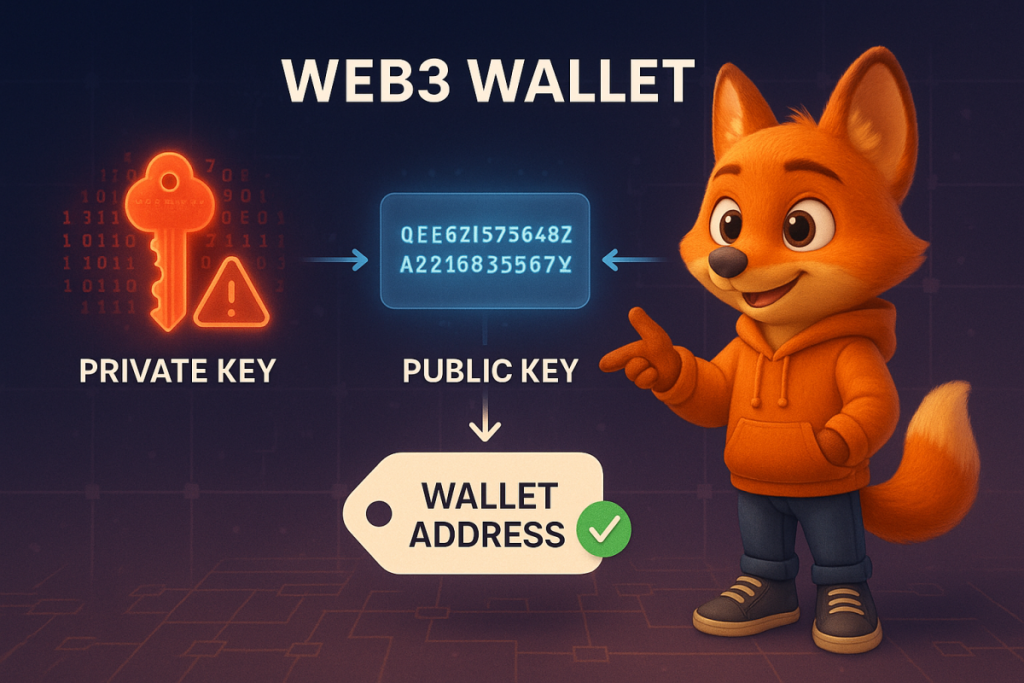
To really grasp how Web3 wallets function, it’s important to understand three critical elements: the private key, the public key, and your wallet address.
- Private Key
This is a long, unique string of letters and numbers that serves as the master key to your wallet. It gives full access to your assets. If someone else gets your private key, they effectively own your funds. That’s why it should never be shared or stored online. Keep it private, always. - Public Key
This is derived from the private key using a one-way mathematical function. It is used to generate your wallet address and verify transactions, but it doesn’t give access to your funds on its own. - Wallet Address
This is a shortened, user-friendly version of the public key. Think of it as your blockchain account number—it’s what you share with others when you want to receive payments or assets.
Types of Web3 Wallets
There are several different types of Web3 wallets, each suited to different use cases and user preferences:
- Non-Custodial Wallets (Self-Custody)
These wallets put you in complete control. You manage your private keys directly, without relying on any third party. Examples include hardware wallets like Ledger and software options like MetaMask or Trust Wallet. - Custodial Wallets
Here, a third-party service—usually a crypto exchange like Coinbase—manages the private keys on your behalf. While easier to use, they introduce trust-based risk, since you’re not the only one with access to your funds. - Hardware Wallets
These are physical devices designed to keep your private keys completely offline, making them nearly immune to hacking. They are ideal for long-term storage and high-value assets. - Browser Extension Wallets
These are lightweight wallets like MetaMask that integrate directly into your web browser, enabling quick access to dApps and transactions from your desktop. - Mobile Wallets
These apps, like Trust Wallet or Rainbow, bring the power of Web3 to your smartphone, allowing for fast and convenient interaction with decentralized ecosystems on the go.
How Web3 Wallets Work
The process of using a Web3 wallet may seem complex at first, but it follows a clear and logical sequence:
- Seed Phrase Generation
When you create a new wallet, you’re given a recovery phrase made up of 12 to 24 random words. This seed phrase is a human-readable backup that can regenerate your private key. Lose it, and you lose access forever. - Transaction Signing
When you send crypto or interact with a dApp, the wallet uses your private key to generate a digital signature. This signature authorizes the action without ever revealing your private key. - Broadcasting Transactions
The signed transaction is sent to the blockchain, where it is picked up by network nodes, validated, and added to the blockchain as a confirmed action. - Viewing Balances and Activity
Your wallet constantly communicates with public blockchain data to display your asset balances, transaction history, and interaction logs—all tied to your wallet address.
Security Best Practices
Security is absolutely critical when using Web3 wallets. Follow these best practices to keep your funds and identity safe:
- Never share your private key or seed phrase. Write it down and store it offline in a secure place—never in a cloud service or photo gallery.
- Use a hardware wallet for storing large amounts of crypto or long-term holdings.
- Set up strong security features like passcodes, PINs, and biometric authentication on both mobile and desktop wallets.
- Always double-check permissions before interacting with a smart contract—some dApps might request more access than necessary.
- Keep your wallet software up to date. Developers regularly release security patches and performance improvements.
Getting Started with Your First Wallet
Setting up your first Web3 wallet is easier than it sounds. Here’s a beginner-friendly path to get started:
- Pick the Right Wallet
If you’re new to crypto, MetaMask (browser) or Trust Wallet (mobile) are great places to start. - Download and Install
Go to the official website or app store to download the wallet. Follow the setup steps to create a new wallet. - Secure Your Seed Phrase
Write down your seed phrase on paper. Don’t store it on your computer or phone. - Add Funds to Your Wallet
Buy some cryptocurrency from a trusted exchange, then transfer it to your new wallet address. - Connect to dApps
Browse a decentralized app and look for a “Connect Wallet” button. Approve the connection request from your wallet interface.
Popular Use Cases for Web3 Wallets
Web3 wallets do far more than just store your coins—they unlock the full potential of the decentralized web:
- DeFi Platforms
Access decentralized finance services like lending, borrowing, staking, and yield farming directly through your wallet. - NFT Marketplaces
Mint, buy, and trade NFTs using your wallet as your identity and payment method. - Blockchain Games
Play games that incorporate digital ownership of in-game assets, all tied to your wallet. - DAOs (Decentralized Autonomous Organizations)
Use your wallet to vote and participate in governance decisions that shape the future of communities and protocols. - Cross-Chain Bridges
Transfer assets between different blockchains without needing a centralized exchange, all through your wallet.
Want more crypto knowledge? Join our newsletter for weekly insights, free guides, and tools.
Looking Ahead: The Future of Web3 Wallets
The next generation of Web3 wallets will be even more powerful, user-friendly, and integrated:
- Smart Accounts and Account Abstraction
Future wallets will support advanced features like social recovery (regaining access with help from trusted contacts), multi-signature approval, and gasless transactions. - Improved Interoperability
Wallets will evolve to support seamless asset management across multiple blockchains, making cross-chain activity smooth and unified. - Better User Experience (UX)
Expect cleaner interfaces, simplified onboarding, easier gas management, and direct fiat on-ramps to make Web3 more accessible to mainstream users.
Start Your Web3 Journey Today
Learning how to use a Web3 wallet is the first step toward full participation in the decentralized world. Whether you’re curious about decentralized finance, NFTs, or blockchain-based communities, your wallet is your gateway to all of it.
Want to take things further?
- Consider using Ledger or another hardware wallet for secure, offline storage.
- Subscribe to our newsletter for weekly crypto insights, in-depth guides, and tools to help you on your journey.
Your First Steps:
- Choose a Web3 wallet like MetaMask or Trust Wallet.
- Set it up and store your seed phrase securely.
- Fund the wallet, connect to a dApp, and start exploring Web3.
What’s the Difference Between Custodial and Non-Custodial Wallets?
The key difference between custodial and non-custodial wallets lies in who holds the private keys that control your crypto assets.
In a custodial wallet, a third-party service—usually a crypto exchange or financial platform—stores your private keys on your behalf. This means you’re trusting someone else with the responsibility and security of your funds. These wallets often offer convenience, faster onboarding, and account recovery options. However, they also carry more risk in terms of hacks or platform shutdowns, since you’re not the only one in control.
A non-custodial wallet, on the other hand, puts you in full control. You generate and store your own private keys (typically via a seed phrase), and no one else has access. This model aligns with the true philosophy of decentralization—complete self-ownership of your digital assets. But with that power comes responsibility: if you lose your seed phrase, there’s no customer support team that can help you recover it. You are your own bank.
Can I Recover My Wallet if I Lose My Device?
Yes, you absolutely can—as long as you have your seed phrase stored safely.
When you first set up a non-custodial Web3 wallet, you’re given a recovery phrase (also called a seed phrase), which is essentially a master backup of your private key. If your device is lost, damaged, or stolen, you can simply install the same wallet app or a compatible one on a new device and enter your seed phrase to restore full access to your wallet and all the funds it contains.
This is why storing your seed phrase offline, in a safe and secure location, is critical. Without it, there’s no way to recover your wallet.
Are Web3 Wallets Safe?
Web3 wallets can be very safe, but that safety depends almost entirely on how you use them.
Because you control the private keys in a non-custodial wallet, you’re also responsible for its security. Here are some best practices to stay protected:
Never share your seed phrase or private key with anyone, not even with people you trust.
Use a hardware wallet (like Ledger or Trezor) to store large amounts of crypto securely offline.
Be cautious when interacting with decentralized apps. Always check the permissions you’re granting, especially when signing transactions or approving smart contracts.
Use biometric authentication or strong passcodes on your wallet apps.
Keep your wallet software updated, as developers frequently patch vulnerabilities.
In short, Web3 wallets are secure if you apply strong security hygiene. Without it, they’re as vulnerable as your weakest link.
Do Web3 Wallets Cost Money?
Most Web3 wallets are completely free to download and use. Apps like MetaMask, Trust Wallet, Rainbow, and Coinbase Wallet do not charge any setup or usage fees.
However, interacting with the blockchain isn’t free. Every time you send crypto, approve a smart contract, or use a decentralized app, you’ll need to pay network fees, commonly referred to as gas fees. These are fees paid to blockchain validators to process and confirm your transaction.
Gas fees vary depending on the network you’re using (Ethereum, Polygon, Arbitrum, etc.) and how congested it is at the time. Some wallets offer tools to help you estimate or reduce these fees before confirming a transaction.
What Does Seed Phrase Self-Custody Mean?
Seed phrase self-custody means you, and only you, are responsible for holding and protecting your wallet’s recovery phrase.
When you choose a non-custodial wallet, you’re not relying on a centralized entity to store or recover your keys. Instead, you’re given a list of 12 or 24 words—the seed phrase—which can regenerate your wallet on any compatible device. This phrase is the only way to access your wallet if your device is lost or reset.
There’s no “forgot password” button or helpline in this setup. If you lose your seed phrase, your access is gone forever. On the other hand, this model guarantees that no one—not hackers, not the government, not even the wallet provider—can access your funds without it.
That’s why self-custody is considered both the most empowering and the most demanding way to manage your crypto. It gives you full sovereignty—but also full responsibility.
“Guess what? When you click and buy via our links, you’re not just enhancing your experience—you‘re also supporting our content creation for free, so we can keep sharing useful blockchain insights. It‘s a pump for both of us!”
-Andre